
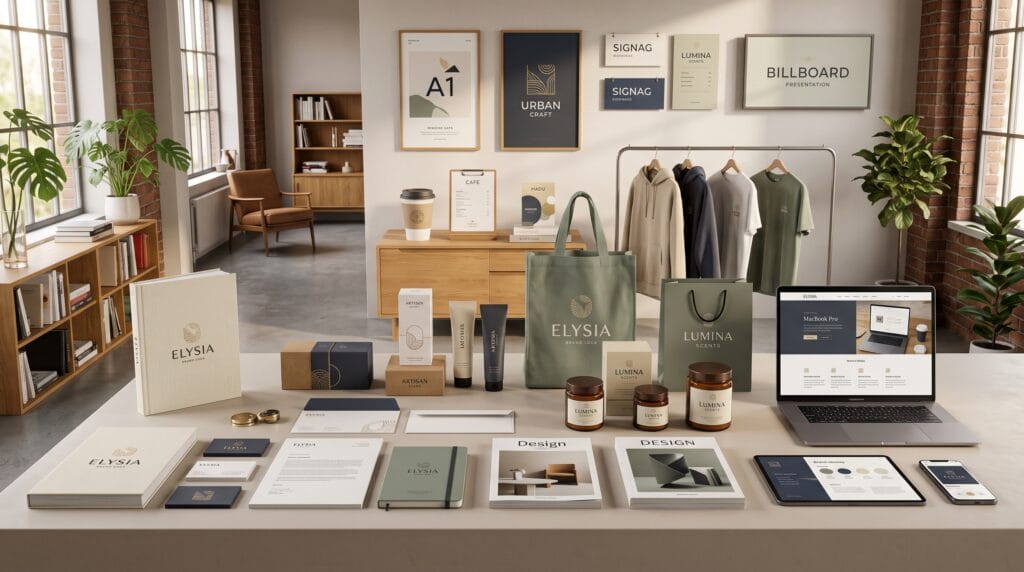
The right graphic design mockup ideas can transform an ordinary portfolio into a polished presentation that immediately captures attention. A design may look attractive on a flat artboard, but potential clients often need to see how it will work in a realistic setting. Mockups help connect your creative concept with its intended application, whether you are presenting a logo, product package, website, poster, business card, or complete brand identity.
For graphic designers, a portfolio is more than a collection of finished files. It is a visual explanation of your skills, decisions, and ability to solve communication problems. Strong graphic design mockup ideas make your projects easier to understand while helping viewers imagine how the design might perform in the real world.
However, using a mockup is not simply a matter of placing artwork into a template. The environment, composition, lighting, colors, and viewing angle must support the project rather than distract from it. This guide explores professional mockup concepts that can elevate your portfolio and help every project feel more convincing.
Why Graphic Design Mockup Ideas Matter
Mockups give context to creative work. They show clients how a design could appear when printed, displayed, packaged, worn, installed, or viewed on a digital device.
A flat logo file may demonstrate the shape of a logo, but it does not show how the mark performs on a storefront, product label, business card, or mobile interface. A packaging dieline may be technically complete, yet a realistic box or bottle presentation makes the concept easier to evaluate.
Effective graphic design mockup ideas can help you:
- Present projects more professionally
- Communicate scale and functionality
- Create stronger visual storytelling
- Make portfolio pages more engaging
- Help clients understand design applications
- Demonstrate attention to detail
- Build a recognizable presentation style
Mockups can also make conceptual projects feel more complete. Even when a design has not been produced physically, a realistic presentation can show how it is intended to work.
1. Logo Mockups for Real-World Brand Applications
Logo projects should rarely be presented as a single symbol on a plain background. Clients need to see whether the logo remains recognizable across different sizes, materials, and environments.
Useful logo mockups include:
- Storefront signage
- Office walls
- Business cards
- Product tags
- Packaging
- Mobile screens
- Social media profiles
- Uniforms
- Delivery vehicles
- Embossed stationery
One of the strongest graphic design mockup ideas is to present the logo through a sequence of relevant applications. A restaurant logo could appear on a menu, takeaway box, shop window, apron, and mobile ordering screen.
Keep Logo Mockups Relevant
Choose applications that match the brand. A technology company may benefit from digital interface and office signage mockups, while a fashion brand may need garment labels, shopping bags, and clothing tags.
Avoid using random products simply because a template looks attractive. Every presentation should reinforce the brand strategy.
2. Packaging Mockup Ideas for Product Designers
Packaging mockups are especially valuable because flat artwork cannot fully communicate shape, scale, material, and shelf impact.
Designers can create mockups for:
- Boxes
- Bottles
- Jars
- Pouches
- Cans
- Tubes
- Food containers
- Cosmetic packaging
- Shipping boxes
- Paper bags
Professional packaging mockups should show more than one angle. Include a primary front view, a side or back view, and a close-up of important details such as typography, texture, or labeling.
These graphic design mockup ideas help demonstrate how the design wraps around the package and how visual elements connect across multiple surfaces.
Build a Complete Product Scene
Instead of showing one isolated package, consider creating a small product family. Display several flavors, sizes, or product variations together.
This allows viewers to see how the design system remains consistent while still differentiating individual products. It is particularly effective for food, beverage, beauty, and wellness branding projects.
3. Business Card and Stationery Mockups
Stationery mockups remain useful for brand identity portfolios because they demonstrate consistency across professional materials.
A complete stationery presentation may include:
- Business cards
- Letterheads
- Envelopes
- Notebooks
- Folders
- Invoices
- Presentation covers
- Email signatures
Use clean compositions and realistic shadows. The design should be the main focus rather than decorative objects surrounding it.
One useful approach is to combine a close-up detail with a wider scene. The close-up can highlight paper texture, foil stamping, embossing, or typography, while the wider image shows how the pieces work together.
4. Website and User Interface Mockups
Digital design deserves realistic presentation too. Screenshots placed directly onto a portfolio page can feel incomplete and may not communicate how users experience the interface.
Website and interface mockups can include:
- Desktop monitors
- Laptops
- Tablets
- Smartphones
- Browser windows
- Application dashboards
- Smartwatch screens
- Multiple-device layouts
These graphic design mockup ideas are especially effective for responsive website projects. Present the same design across desktop, tablet, and mobile screens to demonstrate adaptability.
Show the User Journey
Do not limit a digital project to one homepage image. Show several important screens, such as:
- Homepage
- Product page
- Checkout
- Dashboard
- Mobile menu
- Contact form
- User profile
This creates a more complete story and shows that you considered the entire experience rather than only one attractive page.
5. Poster Mockup Ideas for Better Visual Impact
Posters can be difficult to appreciate when shown as small flat images. A realistic mockup provides scale and shows how the composition works in a public environment.
Consider placing posters in:
- Street advertising displays
- Gallery walls
- Bus shelters
- Music venues
- Cafés
- Retail windows
- Subway stations
- Office interiors
- Event entrances
The environment should match the project. A bold music poster might work in an urban street scene, while an elegant exhibition poster may look better inside a clean gallery.
When using environmental graphic design mockup ideas, ensure that the background does not overpower the artwork. The poster must remain readable and visually dominant.
Also Read: Top Color Trends in Graphic Design Designers Use Now
6. Editorial and Magazine Mockups
Editorial mockups allow designers to show how typography, imagery, and page composition work across multiple spreads.
Useful formats include:
- Magazine covers
- Interior spreads
- Books
- Catalogs
- Annual reports
- Brochures
- Lookbooks
- Newspapers
- Digital publications
Show both the cover and interior pages. A strong cover may attract attention, but interior spreads demonstrate your ability to create hierarchy, manage long-form content, and maintain consistency.
For a stronger portfolio case study, include flat layouts alongside realistic open-book or magazine scenes. This gives viewers both a clear design view and a sense of the final printed object.
7. Social Media Mockups for Campaign Design
Social media projects often involve more than one individual post. They require a consistent visual system that can support multiple messages and formats.
Social media mockups may include:
- Instagram grids
- Story layouts
- Carousel posts
- Facebook advertisements
- LinkedIn graphics
- YouTube thumbnails
- Pinterest pins
- Mobile profile screens
A complete campaign presentation is one of the most useful graphic design mockup ideas for designers working in digital marketing.
Instead of presenting ten separate graphics, organize them into a coordinated grid or place selected designs inside realistic mobile interfaces. This demonstrates how the visual identity works as a system.
8. Apparel and Merchandise Mockup Ideas
Apparel mockups are valuable for logo designers, illustrators, typographers, and merchandise creators.
Common products include:
- T-shirts
- Hoodies
- Caps
- Tote bags
- Jackets
- Uniforms
- Fabric labels
- Socks
- Aprons
Choose realistic fabric textures and ensure that artwork follows the shape and folds of the material. A logo placed flat over a wrinkled shirt will immediately look artificial.
Apparel mockups should also match the intended audience. A streetwear design may need a bold lifestyle presentation, while corporate uniform branding may require a cleaner and more professional setting.
9. Signage and Environmental Graphic Mockups
Environmental graphics demonstrate how design interacts with physical spaces. These mockups are excellent for presenting branding systems and wayfinding projects.
Possible applications include:
- Building signage
- Reception walls
- Window graphics
- Directional signs
- Exhibition displays
- Retail interiors
- Restaurant menus
- Event installations
- Vehicle graphics
Large-scale graphic design mockup ideas help viewers understand how branding can move beyond printed materials and digital screens.
Pay careful attention to perspective, scale, and lighting. Environmental graphics should appear naturally integrated into the architecture.
10. Product Photography Style Mockups
Product photography mockups place designs inside carefully styled scenes. These presentations are popular for packaging, stationery, cosmetics, food products, and handmade goods.
Props can add mood and context, but they should remain relevant. For example:
- Natural ingredients beside food packaging
- Flowers and stones beside skincare products
- Pens and notebooks around stationery
- Fabric swatches near fashion branding
- Coffee beans beside a coffee package
The best graphic design mockup ideas use props to support the story without creating visual clutter.
Keep the color palette aligned with the project. A neutral background may help colorful packaging stand out, while a darker environment can create a premium or dramatic mood.
Also Read: Graphic Design Layout Ideas How to Use White Space Better
Create Custom Mockups for a Unique Portfolio
Ready-made templates are convenient, but using the same popular mockups as thousands of other designers can make your portfolio feel generic.
Custom mockups help create a more original presentation. You can produce them by:
- Photographing blank products
- Creating 3D models
- Combining stock photographs with smart objects
- Building scenes in Photoshop
- Using realistic shadows and textures
- Creating simple compositions in Blender
- Generating custom backgrounds and applying designs manually
You do not need advanced 3D skills for every project. Even a carefully photographed sheet of paper, package, or device can become a useful custom mockup.
Original graphic design mockup ideas can also create a consistent visual identity across your entire portfolio.
How to Choose the Best Graphic Design Mockup Ideas
Not every project requires the same presentation style. Select mockups based on the design’s purpose, audience, and real-world application.
Ask these questions:
- Where would this design realistically appear?
- Which application best demonstrates its value?
- Does the environment match the brand personality?
- Is the artwork still easy to see?
- Does the mockup show important details?
- Are the lighting and shadows believable?
- Does the presentation support the project story?
Choose quality over quantity. Three well-selected mockups usually communicate more than fifteen repetitive scenes.
Common Mockup Presentation Mistakes
Mockups can weaken a portfolio when used carelessly. Common problems include:
1. Using Too Many Similar Mockups
Showing the same logo on several nearly identical walls adds little value. Present a variety of meaningful applications instead.
2. Choosing Unrealistic Environments
A luxury brand may feel inconsistent when placed in a casual or poorly styled scene. Match the mockup environment to the brand strategy.
3. Making the Background Too Dominant
Busy props, dramatic shadows, and excessive textures can distract from the actual design.
4. Distorting the Artwork
Incorrect perspective, stretching, or unrealistic placement makes the design appear unprofessional.
5. Hiding Weak Design Decisions
Mockups should enhance good work, not hide typography, spacing, or layout problems. Include some clear, flat presentations so viewers can evaluate the design itself.
Build a Portfolio Story With Graphic Design Mockup Ideas
A strong case study should tell a visual story. Start by introducing the creative problem, then show the design system and its applications.
A useful portfolio structure might include:
- Project overview
- Logo or core visual concept
- Typography and color palette
- Packaging or stationery applications
- Digital or social media applications
- Environmental mockups
- Final project summary
This progression helps clients understand your process and see how the design works across multiple touchpoints.
Use graphic design mockup ideas to support the narrative rather than adding them only for decoration.
Recommended Tools for Creating Design Mockups
Several tools can help designers create polished mockup presentations.
| Tool | Best Use |
|---|---|
| Adobe Photoshop | Smart object and photo-based mockups |
| Adobe Illustrator | Vector artwork and flat presentations |
| Adobe Dimension | Simple 3D product scenes |
| Blender | Custom 3D mockups and realistic rendering |
| Figma | Website, app, and interface presentations |
| Canva | Fast social media and basic device mockups |
| Placeit | Quick ready-made mockup templates |
| Mockup World | Free mockup resource discovery |
| Smartmockups | Browser-based device and product mockups |
| Procreate | Hand-drawn presentation concepts |
Choose tools based on the level of realism and customization the project requires.
Final Checklist for Professional Mockup Presentations
Before adding a mockup to your portfolio, check the following:
- Is the design clearly visible?
- Does the mockup match the project?
- Is the scale realistic?
- Are perspective and shadows accurate?
- Is the background free from distractions?
- Are the colors consistent?
- Does the image have sufficient resolution?
- Are you showing different applications?
- Does the presentation strengthen the case study?
- Does it look unique compared with common templates?
This checklist will help ensure your graphic design mockup ideas improve the portfolio rather than simply making it more decorative.
Also Read: Graphic Design for Branding That Makes Products Look Better
Final Thoughts on Graphic Design Mockup Ideas
The best graphic design mockup ideas help clients understand how creative work functions in real situations. From logo signage and packaging scenes to responsive website displays and editorial spreads, mockups add context, realism, and professional polish.
Successful mockup presentations are relevant, realistic, and visually consistent. Choose applications that match the project, avoid unnecessary repetition, and ensure the environment supports the design rather than competing with it.
You do not need to use every available template. A few carefully chosen graphic design mockup ideas can communicate your skills more effectively than a large collection of generic presentations. By combining strong design work with thoughtful visual storytelling, you can build a portfolio that feels memorable, credible, and ready to attract better creative opportunities.
For high-quality fonts to boost your income, check out Letter Crafted. Our professional fonts are perfect for branding, marketing, and content creation. So, don’t miss this opportunity.