
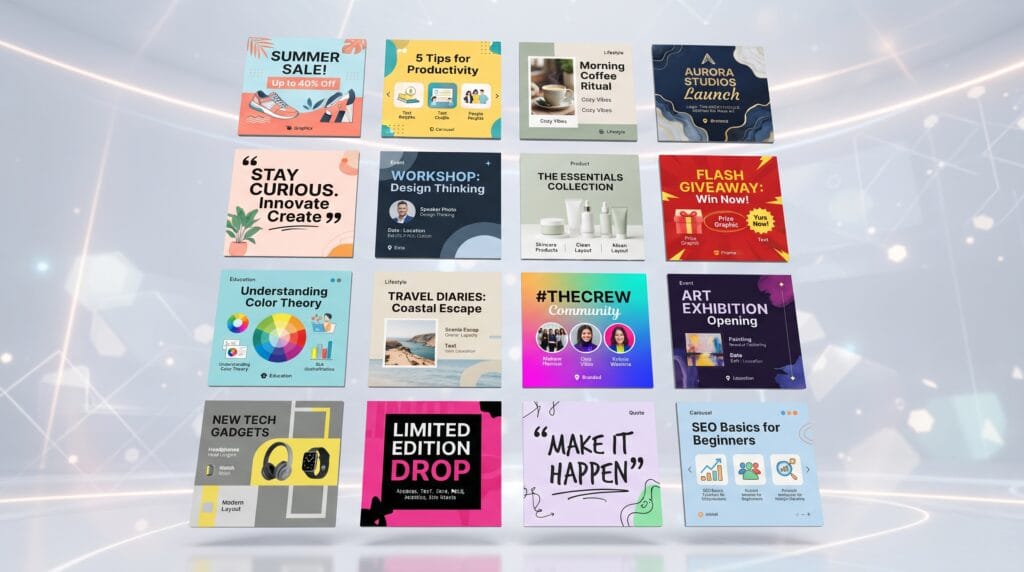
Strong social media graphic design ideas can help creators and brands make content more recognizable, useful, and engaging. Social platforms move quickly, so visuals need to communicate a message clearly while still fitting the personality of the account. A good design should catch attention, but it also needs enough structure for people to understand what the post is about.
The goal is not to make every post highly decorative.
Some of the most effective social graphics are simple. They use clear typography, a focused color palette, consistent spacing, and one strong message.
The best social media graphic design ideas also work as part of a system rather than isolated posts. When several graphics share the same fonts, colors, photography, and layout principles, the feed becomes easier to recognize.
This guide explores 50 practical ideas that creators, marketers, and small businesses can adapt for Instagram, TikTok, Pinterest, LinkedIn, Facebook, and other social platforms.
Why Social Media Graphic Design Ideas Matter
Social media users often decide whether to stop scrolling within seconds.
Visual design helps communicate:
- What the post is about
- Who created it
- Whether it is relevant
- What action to take next
Consistent social media graphic design ideas can also strengthen brand recognition over time.
A creator who repeatedly uses the same typography style and color palette becomes easier to identify.
A business that uses consistent product photography and campaign graphics appears more organized.
Design does not replace useful content, but it helps useful content become easier to notice and understand.
1. Educational Carousel Posts
Carousels are useful for breaking complicated topics into smaller steps.
A simple structure might be:
- Strong cover
- Key point
- Explanation
- Example
- Practical tip
- Summary
- Call to action
Use large headlines and short supporting text.
Avoid trying to fit an entire blog article onto one slide.
2. Quote Graphics
Quote graphics are simple but highly reusable.
They can work for:
- Inspiration
- Education
- Humor
- Brand values
- Industry insights
Use one primary quote and keep the background controlled.
Quote-focused social media graphic design ideas work best when typography becomes the main visual element.
3. Product Feature Posts
Highlight one product feature at a time.
For example:
- Lightweight
- Water-resistant
- Made from recycled materials
Use a product image alongside one clear benefit.
This makes the content easier to scan than a graphic listing ten features at once.
4. Before-and-After Graphics
Before-and-after posts work well for showing transformation.
They can be used for:
- Design projects
- Photography edits
- Branding
- Home renovation
- Fitness
- Beauty
- Product improvement
Keep both images comparable in size and angle.
The visual difference should be easy to understand immediately.
5. Social Media Graphic Design Ideas for Testimonials
Customer testimonials can become stronger when presented visually.
Use:
- Short quote
- Customer name
- Optional photo
- Brand colors
Do not place entire paragraphs inside small graphics.
Select the most meaningful sentence and place the longer review in the caption if needed.
6. Step-by-Step Tutorial Graphics
Tutorial posts can explain simple processes visually.
Examples include:
- How to edit a photo
- How to create a logo
- How to style a product
- How to prepare a recipe
- How to use an app feature
Use numbering and consistent visual hierarchy.
A repeated layout helps users understand the sequence quickly.
7. Checklist Posts
Checklists are useful because people can save them for later.
Ideas include:
- Launch checklist
- Photography checklist
- Branding checklist
- Packing checklist
- Content checklist
Use checkboxes or simple icons sparingly.
Readable structure matters more than decoration.
8. Tips and Tricks Posts
Create one graphic containing three to five short tips.
For example:
3 Ways to Improve Your Logo
Keep each point concise.
Tip-based social media graphic design ideas work well for educational brands and creators who want to build authority.
9. Myth vs. Fact Graphics
This format is useful when audiences commonly misunderstand a topic.
Split the design into two clear sections:
Myth
and
Fact
Use contrast to make the difference obvious.
Avoid using too many colors.
10. FAQ Social Media Posts
Turn common customer questions into graphics.
Examples:
- “Do you ship internationally?”
- “Can I use this font commercially?”
- “How long does delivery take?”
Each graphic can answer one question.
FAQ content reduces repeated customer inquiries while creating useful social posts.
11. Behind-the-Scenes Graphics
Behind-the-scenes content makes a brand feel more human.
You can show:
- Sketches
- Workspaces
- Packaging
- Editing
- Production
- Team moments
Add a small label or headline rather than covering the image with too much text.
12. Process Timeline Graphics
Show how a project moves from beginning to completion.
For example:
Research → Sketch → Refine → Final Design
This format works especially well for designers, artists, agencies, and service businesses.
Timeline social media graphic design ideas can make professional processes easier for clients to understand.
13. New Product Announcement
Create a clear launch graphic featuring:
- Product name
- Hero image
- Launch date
- Short benefit
- CTA
Avoid adding every technical detail.
The purpose of the graphic is to create interest.
Additional information can appear in later posts.
14. Limited-Time Promotion Graphics
Promotional graphics should communicate the offer immediately.
Prioritize:
- Discount
- Product
- Deadline
- Call to action
For example:
20% OFF
Ends Sunday
Do not allow decorative elements to compete with the promotion.
15. Countdown Posts
Countdown graphics build anticipation.
Use them before:
- Launches
- Sales
- Events
- Product releases
- Webinars
Keep the number large.
For example:
3 DAYS TO GO
Maintain the same design system across each countdown post.
16. Social Media Graphic Design Ideas for Sales
Sales posts often become visually noisy because designers add too many discount badges, stars, arrows, and colors.
Use one main promotional message.
For example:
SUMMER SALE
UP TO 40% OFF
Pair it with strong product photography and a clear call to action.
17. Product Comparison Graphics
Comparison graphics help users make decisions.
Compare:
- Features
- Plans
- Product sizes
- Versions
- Packages
Use a simple two-column or three-column layout.
Do not exaggerate differences just to make one option appear better.
18. Feature Comparison Carousels
If a comparison contains too much information for one graphic, turn it into a carousel.
Each slide can focus on one category.
For example:
- Slide 1: Overview
- Slide 2: Features
- Slide 3: Pricing
- Slide 4: Best use case
This keeps information easier to understand.
19. Data and Statistic Graphics
Turn useful statistics into simple visuals.
Use one strong number.
For example:
72%
Then add a short explanation.
Data-focused social media graphic design ideas should emphasize the finding rather than complicated chart decoration.
Always verify the source before publishing statistics.
20. Mini Infographics
Mini infographics can explain relationships or processes.
Possible topics include:
- Marketing funnel
- Design process
- Customer journey
- Content workflow
Keep the information limited.
A social graphic is not a substitute for a detailed report.
Also Read: How to Design Minimalist Brand Graphics With Simple Templates
21. Branded Meme Graphics
Memes can help brands feel more conversational when humor fits the audience.
Use recognizable formats carefully and keep branding subtle.
Do not force humor into industries where it could feel inappropriate.
A small logo or consistent typography may be enough to make the content recognizable.
22. Reaction Graphics
Reaction graphics can respond to trends, industry news, or relatable situations.
Examples:
“When the client approves the first concept.”
Pair a short line with expressive imagery.
These posts can feel highly shareable when the humor is specific to the audience.
23. Social Media Graphic Design Ideas for Seasonal Content
Seasonal content can adapt the visual identity without replacing it.
Create graphics for:
- New Year
- Valentine’s Day
- Spring
- Summer
- Halloween
- Christmas
Use seasonal accents while keeping core typography and branding recognizable.
24. Holiday Greeting Posts
Holiday greetings do not need to be heavily promotional.
A simple message can strengthen community connection.
For example:
Happy Holidays from Our Team
Use a restrained seasonal design and recognizable brand colors.
25. Event Promotion Graphics
Event posts need clear information.
Include:
- Event title
- Date
- Time
- Location
- CTA
Keep the hierarchy obvious.
Users should not need to search the image for the event date.
26. Webinar Announcement Posts
Webinar graphics can include:
- Topic
- Speaker
- Date
- Time
- Registration CTA
Use a professional photo when appropriate.
Avoid covering the speaker’s face with decorative typography.
27. Social Media Graphic Design Ideas for Interviews
Highlight interviews with customers, founders, creators, or industry professionals.
Create a cover slide with:
- Portrait
- Name
- Role
- Short topic
Then use a carousel to present selected insights.
This gives longer conversations a visual format that works well on social media.
28. Expert Tip Graphics
Create graphics featuring one short expert insight.
For example:
“Choose typography before adding decoration.”
Add the expert’s name and role.
This format can strengthen authority while remaining easy to share.
29. Team Introduction Posts
Introduce team members with a consistent template.
Include:
- Name
- Role
- Photo
- Short personal detail
Keep the layout professional but friendly.
Repeating one template makes a growing team series feel connected.
30. Founder Story Graphics
Founder stories can make a brand feel more personal.
Create a carousel explaining:
- Why the business started
- Initial challenge
- Key turning point
- Current mission
Use real photography where possible.
Story-focused social media graphic design ideas work best when the content feels specific rather than overly corporate.
31. Brand Values Posts
Use visual content to explain what the brand believes in.
For example:
- Craftsmanship
- Accessibility
- Sustainability
Create one post for each value rather than listing everything at once.
Support each value with a real example in the caption.
32. Mission Statement Graphics
A mission statement can become a strong brand post if it is concise.
Avoid turning a long paragraph into a small social graphic.
Highlight one central sentence.
Use typography and spacing to make it feel deliberate.
33. Portfolio Showcase Posts
Designers, photographers, artists, and agencies can turn portfolio work into social content.
Show:
- Final project
- Close-up details
- Before and after
- Mockups
- Process
A carousel can provide more context than one image alone.
34. Case Study Carousels
Case studies work particularly well for service businesses.
A simple structure might be:
- Client problem
- Strategy
- Design solution
- Result
- Key takeaway
Use visual evidence instead of making every slide text-heavy.
35. User-Generated Content Frames
Customer photos can be presented using a consistent branded frame.
Add:
- Small logo
- Customer handle
- Product name
Do not overdesign the frame.
The customer’s content should remain the focus.
36. Customer Spotlight Graphics
Highlight customers or community members.
Share a brief story, quote, or achievement.
Community-focused social media graphic design ideas can strengthen loyalty because they shift attention away from the business itself.
37. Product Review Graphics
Turn strong product reviews into polished visuals.
Use short excerpts such as:
“Simple, beautiful, and exactly what I needed.”
Pair them with product photography.
If the review is lengthy, place the rest in the caption.
38. Social Proof Number Graphics
Highlight real milestones such as:
- Customers served
- Downloads
- Products sold
- Years in business
For example:
10,000+ Downloads
Use these claims only when the numbers are accurate.
39. Content Series Covers
If you publish recurring educational content, create a recognizable series cover.
Examples:
- Design Tip Monday
- Weekly Branding Notes
- Creator Toolkit
Consistent covers help followers recognize recurring content.
40. Weekly Roundup Graphics
Summarize the week’s most useful content.
A roundup can include:
- New article
- Best tip
- Favorite tool
- Upcoming event
This format helps reuse existing content instead of creating everything from scratch.
Also Read: Seasonal Autumn Design Trends for Better Visual Campaigns
41. Blog Promotion Graphics
Turn blog posts into social assets.
Create a graphic featuring:
- Article title
- Short hook
- Relevant image
- Brand identity
Then create additional posts using individual tips from the same article.
This makes one long-form piece support several social media graphic design ideas.
42. Video Thumbnail Graphics
Video content still needs strong cover visuals.
Use:
- Clear subject
- Short headline
- Strong contrast
- Consistent typography
Avoid repeating the entire video title if it is too long.
A shorter visual headline usually works better.
43. Podcast Episode Graphics
Create a consistent template containing:
- Guest portrait
- Episode title
- Podcast name
- Episode number
Keep text hierarchy strong.
Use the same core layout for every episode to build recognition.
44. Announcement Graphics
Announcements may include:
- New website
- New team member
- New location
- New collaboration
- New feature
Lead with the news.
For example:
WE’VE MOVED
or
NEW FEATURE
Keep supporting information smaller.
45. Collaboration Posts
When two brands or creators collaborate, balance both identities.
Avoid making one logo much larger unless there is a strategic reason.
Find a shared visual direction through:
- Neutral background
- Combined palette
- Balanced typography
- Split composition
Collaboration social media graphic design ideas should feel like one campaign rather than two unrelated posts placed together.
46. Question Posts
Questions can encourage audience interaction.
Examples:
- “Which logo would you choose?”
- “What is your biggest design challenge?”
Use the question as the headline.
Keep the graphic simple enough that the message is understood instantly.
47. Poll Graphics
Create two or three clearly separated choices.
For example:
- A: Minimal
- B: Retro
Use visuals where possible.
Poll content can also provide useful audience research.
48. This-or-That Graphics
This-or-that designs work well for:
- Style comparisons
- Product choices
- Color preferences
- Creative decisions
Use balanced composition so both choices receive equal visual attention.
These posts can be simple but highly interactive.
49. Saveable Resource Graphics
Create content people may want to reference later.
Examples include:
- Font pairing list
- Color combinations
- Design checklist
- Content sizes
- Photography tips
Saveable social media graphic design ideas provide practical value beyond entertainment.
Use concise text and clear organization.
50. Brand Template Systems
Instead of designing one post at a time, build a complete template library.
Create reusable designs for:
- Quote
- Tutorial
- Product
- Testimonial
- Announcement
- Sale
- Carousel
- Blog promotion
This is one of the strongest long-term approaches because it improves both consistency and production speed.
Social Media Graphic Design Ideas for Better Typography
Typography is one of the most important elements in social graphics.
Use a simple hierarchy:
Headline
Large and immediately visible.
Supporting text
Smaller and easier to scan.
CTA
Clear but secondary to the main message.
Avoid using too many fonts.
One display font and one readable supporting font are usually enough.
Consistent typography makes social media graphic design ideas feel more connected across an entire feed.
Build a Consistent Color System
Choose a limited palette for social content.
A simple system might include:
- Primary brand color
- Secondary color
- Light neutral
- Dark neutral
- Accent color
Different content types can use different combinations while still remaining recognizable.
For example, tutorials may use the primary color while promotions use the accent.
This creates variety without losing consistency.
Use Photography Consistently
If photography is part of the brand, define a visual direction.
Consider:
- Lighting
- Color temperature
- Background
- Composition
- Editing
A feed using warm natural product photography one day and heavily saturated imagery the next may feel disconnected.
Consistency does not mean every image must look identical.
It means they should feel related.
Design Social Graphics for Mobile First
Most users will see social posts on a small screen.
Design at realistic viewing size.
Check whether:
- Headlines are readable
- Fine details remain visible
- Buttons and labels are clear
- Text is not overcrowded
Do not assume that a design that looks good on a large desktop monitor will remain readable on a phone.
Create Strong Visual Hierarchy
Users should know what to look at first.
Use:
- Size
- Contrast
- Position
- Spacing
- Weight
For example, in a sale post, the discount may be the largest element.
In an educational post, the headline may come first.
Hierarchy makes social media graphic design ideas easier to scan.
Use Negative Space
Not every area needs an image, icon, or decorative shape.
Negative space gives content room to breathe.
It can also make typography feel more premium.
If a graphic feels too busy, try removing elements before adding new ones.
Simple layouts often perform better because the message becomes easier to understand.
Create Platform-Specific Variations
One design should not always be copied unchanged across every platform.
Adapt formats for:
For example, Pinterest usually benefits from vertical graphics, while LinkedIn carousels may need more structured educational layouts.
Maintain the same visual identity while adjusting composition.
Helpful Tools for Social Media Graphic Design
Several tools can help creators build social content more efficiently.
Canva
Useful for reusable social templates, carousels, promotions, and simple animations.
Adobe Photoshop
Useful for photography, advanced image editing, campaign graphics, and compositing.
Adobe Illustrator
Ideal for custom typography, icons, illustrations, and vector graphic elements.
Figma
Useful for creating social design systems, reusable components, and collaborative templates.
Adobe Express
Helpful for fast social graphics and branded content.
Lightroom
Useful for maintaining consistent photography and color treatment.
The best tool depends on the content style and level of design control required.
Common Social Media Graphic Design Mistakes
Using Too Much Text
Move supporting details into the caption.
Following Every Trend
Trends can help content feel current, but the core identity should remain recognizable.
Using Too Many Fonts
Limit typography to a controlled system.
Ignoring Mobile Readability
Always test at actual viewing size.
Making Every Post Look Completely Different
Create variation inside one visual system.
Overusing Decorative Elements
Every graphic element should support the message.
Designing Without a Clear Goal
Know whether the post should educate, promote, entertain, or build trust.
Social Media Graphic Design Ideas Checklist
Before publishing a social graphic, confirm that:
- The main message is obvious.
- The design matches the content goal.
- Typography is readable.
- The hierarchy is clear.
- Brand colors are consistent.
- Photography matches the visual style.
- Decorative elements have a purpose.
- Text remains readable on mobile.
- The layout fits the platform.
- The design includes enough negative space.
- The CTA is clear when needed.
- The post feels related to other brand content.
- Spelling and information have been checked.
- Important claims are accurate.
- The design can be adapted into other formats when useful.
Also Read: Festival Graphic Design Styles for Better Marketing Results
Final Thoughts
The strongest social media graphic design ideas are not simply attractive. They help people understand, remember, and interact with content more easily.
Creators can use carousels to educate, quote graphics to inspire, testimonials to build trust, promotional posts to drive sales, and behind-the-scenes content to make a brand feel more personal.
The key is consistency.
Build a clear typography system, limited color palette, photography direction, and reusable layout rules. Then create enough variation that the feed remains interesting without feeling random.
Also remember that every post does not need to be highly polished.
Sometimes a simple headline, useful tip, and strong composition will communicate more effectively than a design filled with decorative elements.
Use these 50 social media graphic design ideas as starting points. Adapt them to your audience, platform, and brand personality.
Over time, a consistent collection of useful and recognizable visuals can help creators and businesses build stronger feeds, clearer communication, and a more memorable social presence.
For high-quality fonts to boost your income, check out Letter Crafted. Our professional fonts are perfect for branding, marketing, and content creation. So, don’t miss this opportunity.