
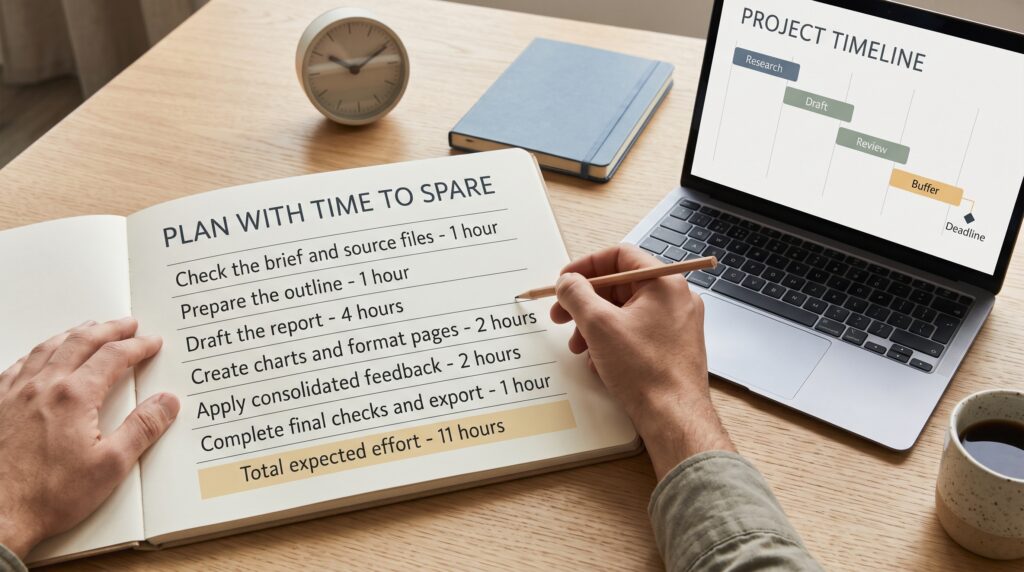
Learning how to estimate task time helps you make commitments that fit the work and the hours actually available. A task that sounds like a quick afternoon job may include research, preparation, revisions, and approval. When those steps stay invisible, deadlines become difficult to meet even when everyone works steadily.
A useful estimate makes assumptions visible. It explains what needs to happen, how much effort each part requires, and what could affect completion. This guide gives you a practical process for planning your own workload or discussing deadlines with colleagues and clients.
Start Learning How to Estimate Task Time With a Clear Outcome
Before assigning hours, define what finished means. “Prepare the report” could describe a rough draft, a reviewed document, or an approved file ready for distribution.
Write a short completion statement. For example: “Deliver a ten-page report using the supplied data, including two charts and one review round.”
Then list what the task excludes. Perhaps additional research, translation, and presentation slides belong to separate work.
This boundary gives your estimate a stable starting point. If the expected outcome changes, you can explain why the time estimate needs to change too.
Break the Work Into Visible Steps
Large task labels hide smaller activities. Divide the work into pieces you can understand and estimate individually.
For a report, those pieces might include checking the brief, reviewing data, preparing an outline, drafting, building charts, editing, and exporting the final file.
Keep the breakdown useful rather than exhaustive. You need enough detail to notice missing work, without spending an hour estimating every paragraph.
Understanding how to estimate task time becomes easier when each step has a recognizable result. “Review source data” is clearer when you specify that it ends with a checked dataset and a list of unresolved questions.
Separate Working Hours From Elapsed Time
Effort and delivery time describe different things. Effort is the time you actively spend working. Elapsed time includes the calendar period between starting and finishing.
A task requiring six working hours may span several days if you must wait for information or approval.
When deciding how to estimate task time, record both. You might need three hours to prepare a draft, one day for someone to review it, and another hour to make changes.
Waiting does not necessarily consume your working hours, but it still affects the deadline. Keeping the two measures separate prevents confusion about why a seemingly small task needs several calendar days.
Use Previous Work to Estimate Task Time
Your own completed tasks provide useful comparisons. Look for work with similar requirements, complexity, and review expectations.
Check calendar entries, task notes, or time records rather than relying only on memory. A project that felt quick may have involved several short sessions you have forgotten.
To improve how to estimate task time, separate preparation, production, and revisions in your records. This helps you identify which parts vary most.
Adjust the comparison when circumstances differ. A familiar monthly report is not equivalent to a first-time report requiring a new format. Write down the difference instead of quietly adding an unexplained number of hours.
Also Read: Email Marketing Tutorial for Better Marketing Results
Estimate a Range Before Choosing a Commitment
A single number can hide uncertainty. Try describing a likely range before deciding what to promise.
For each step, consider a straightforward case, an expected case, and a difficult but plausible case. Identify what would create the difference.
For example, chart preparation might take longer if the supplied data needs cleaning. That uncertainty belongs in the estimate.
Learning how to estimate task time includes recognizing where your knowledge is limited. If the range is very wide, spend a short period investigating the task first. A sample, prototype, or brief clarification may narrow the uncertainty before you commit.
Calculate the Capacity You Actually Have
Your calendar may contain eight working hours, but those hours are rarely all available for one project. Meetings, existing commitments, routine administration, and support requests take part of the day.
Review the period before the proposed deadline. Subtract known commitments and identify realistic working blocks.
Capacity planning is essential to how to estimate task time because effort alone cannot determine a delivery date. Twelve hours of work will not fit into two days if those days contain only three available project hours each.
Avoid counting evenings or weekends automatically. Include extra hours only when they are genuinely available and deliberately agreed.
Include Reviews and Dependencies When Estimating Task Time
List anything that must happen before the next step can begin. You may need access to a system, a decision from a manager, or files from another team.
For each dependency, identify an owner and a required date. Confirm availability instead of assuming that an approval request will receive an immediate response.
Reviews need their own definition too. Specify how many rounds are included, who consolidates feedback, and when comments are due.
A dependable approach to how to estimate task time treats these arrangements as part of planning. Otherwise, a completed draft can sit waiting while the promised delivery date continues to approach.
Add Contingency for Specific Uncertainties
Contingency is room for identified uncertainty. It should have a reason, rather than appearing as an arbitrary extra day.
Perhaps the task uses an unfamiliar tool, the data has not been checked, or a reviewer may request substantial changes. Explain which uncertainty the allowance covers.
When practicing how to estimate task time, avoid counting the same risk twice. If your expected effort already includes one revision round, do not add another allowance for that exact work without explanation.
Keep contingency separate from known activities where possible. This makes it easier to learn afterward whether the uncertainty occurred and whether the allowance was appropriate.
Also Read: Google Analytics Tutorial for Better Marketing Results
Apply the Process to a Worked Example
Imagine you need to deliver a short client report. The brief and source files are available, and the agreed scope includes one consolidated review round.
Your illustrative effort estimate could look like this:
| Work step | Expected effort |
|---|---|
| Check the brief and source files | 1 hour |
| Prepare the outline | 1 hour |
| Draft the report | 4 hours |
| Create charts and format pages | 2 hours |
| Apply consolidated feedback | 2 hours |
| Complete final checks and export | 1 hour |
| Total expected effort | 11 hours |
You also allow two hours for possible data corrections. That creates a planning allowance of thirteen working hours.
Suppose you have three project hours available each weekday. You could check the brief, outline the report, and begin drafting on Monday. Tuesday would continue drafting. Wednesday would complete charts and formatting, with the draft sent for review afterward.
The reviewer has agreed to respond by Thursday afternoon. Friday provides time for revisions and final checks.
This example shows how to estimate task time without confusing thirteen working hours with thirteen uninterrupted calendar hours. The Friday commitment depends on source readiness, available capacity, and feedback arriving as agreed.
Communicate the Estimate With Its Assumptions
A useful deadline statement explains more than a date. Include the deliverable, expected effort, review arrangement, and conditions that affect completion.
For the example above, you could communicate:
“The report is planned for Friday afternoon. This includes one consolidated review round, with feedback due Thursday afternoon. Additional research or later feedback will require a revised delivery date.”
Knowing how to estimate task time helps you discuss trade-offs clearly. If someone needs an earlier result, ask which requirement can change. A shorter report, fewer charts, or a preliminary version may fit the available time.
Update Task Estimates When Conditions Change
An estimate reflects what you know when you make it. Update it when new information materially changes the work.
Review Task Time at Meaningful Checkpoints
After checking the source files or completing the first section, compare progress with the plan. Look for evidence that the remaining work differs from your assumptions.
Explain Deadline Changes Early
State what changed, how much work remains, and what options are available. Give people time to adjust their own plans.
Keep Scope Changes Visible
Record additional requests separately. A larger deliverable may need a different deadline, even when the original estimate was reasonable.
Improve Your Next Estimate With a Brief Review
After finishing, compare the estimate with what happened. Separate additional scope, waiting time, interruptions, and underestimated effort.
Ask which difference could have been anticipated. Perhaps you forgot formatting checks or assumed a familiar process would transfer to unfamiliar software.
Keep a small record containing the task type, estimated hours, actual hours, and a short explanation of the gap. You do not need an elaborate tracking system.
Over time, these notes help refine how to estimate task time using evidence from your own work. The aim is to make assumptions more accurate and recognize uncertainty earlier.
Also Read: Affiliate Marketing Tutorial Mistakes and How to Avoid Them
Conclusion – Set Deadlines You Can Explain
Learning how to estimate task time starts with making the work visible. Define the outcome, divide it into manageable steps, and compare the effort with your actual calendar.
Then account for reviews, dependencies, and specific uncertainties. Communicate the conditions behind the date and revise the plan when those conditions change.
For your next assignment, spend a few minutes writing the steps before promising a deadline. That small planning habit can make your commitments clearer and your working week more manageable.
For high-quality fonts to boost your income, check out Letter Crafted. Our professional fonts are perfect for branding, marketing, and content creation. So, don’t miss this opportunity.