
A strong graphic design portfolio can help freelancers communicate their skills, creative thinking, and professional value before they ever speak with a potential client. A portfolio is more than a gallery of attractive visuals. It should show what kind of work you create, how you solve design problems, who you want to work with, and why someone should trust you with a real project.
You do not need dozens of projects to look experienced.
A smaller collection of carefully selected work can often feel more professional than a large portfolio filled with inconsistent or outdated designs.
This guide explains how to improve your graphic design portfolio so it presents your work clearly, builds confidence, and helps attract better freelance opportunities.
Why a Graphic Design Portfolio Matters for Freelancers
Clients often want proof before hiring a designer.
They may look at your portfolio to understand:
- Your visual style
- Your technical skills
- Your experience
- Your creative range
- Your problem-solving ability
- Your professionalism
- Your preferred type of work
A portfolio can also help clients decide whether your design approach fits their brand.
For freelancers, a professional graphic design portfolio can work like a sales tool.
It should make it easier for someone to answer:
Can this designer solve the kind of problem I have?
That question is more important than simply asking whether the work looks attractive.
1. Graphic Design Portfolio with Define the Type of Work You Want
Before selecting projects, decide what kind of work you want to attract.
If you want branding clients, your portfolio should prominently feature:
- Logo design
- Brand identity
- Packaging
- Typography
- Brand guidelines
- Social media systems
If you want editorial work, focus more on:
- Magazine layouts
- Reports
- Brochures
- Books
- Publications
If you want digital design work, you might include:
- Landing pages
- Websites
- User interfaces
- Campaign graphics
- Digital advertising
Your graphic design portfolio should support your future direction, not only document everything you have done in the past.
Avoid Showing Every Type of Design
Freelancers sometimes include every project because they want to appear versatile.
However, too much variety can make positioning unclear.
A visitor may see:
- Wedding invitation
- App interface
- Restaurant logo
- Cartoon illustration
- Corporate brochure
- T-shirt graphic
Each project may be good individually, but together they may not communicate a clear specialization.
Choose work that supports the kind of designer you want clients to remember.
2. Graphic Design Portfolio with Select Your Strongest Projects
Quality matters more than quantity.
For many freelancers, six to twelve strong projects can be enough to create a focused portfolio.
Evaluate each project by asking:
- Does it represent my current skill level?
- Is it relevant to the clients I want?
- Does it show something different from the other projects?
- Can I explain the design decisions?
- Would I be happy to create more work like this?
Remove weak projects even if you spent a lot of time creating them.
Your portfolio should represent where your skills are now.
Remove Outdated Work
Design skills change quickly.
A project from several years ago may no longer represent your typography, layout, branding, or presentation ability.
Review your graphic design portfolio regularly.
Replacing older work with stronger recent projects keeps the portfolio relevant.
3. Graphic Design Portfolio with Lead With Your Best Work
First impressions matter.
Do not make visitors scroll through average work before reaching your strongest project.
Place high-quality, relevant projects near the beginning.
Your first few projects should communicate:
- Skill
- Professionalism
- Style
- Relevance
If you specialize in branding, your first project might be a complete identity system rather than an isolated social media graphic.
Think of the portfolio order as part of the presentation itself.
Create Better Project Case Studies
A professional portfolio should show more than final images.
Case studies help clients understand how you think.
A useful project case study can include:
- Client or project background
- Design challenge
- Goals
- Target audience
- Creative direction
- Process
- Final solution
- Applications
- Results, when available
You do not need to write a long essay.
A few clear paragraphs can provide enough context.
Explain the Design Problem
Instead of saying:
I created a modern logo for a coffee shop.
explain the objective.
For example:
The cafe needed a visual identity that could appeal to younger urban customers while still feeling warm and approachable.
This gives the work purpose.
Clients are often more interested in how you solved the problem than in which software you used.
4. Graphic Design Portfolio with Show the Design Process
Process can make your work feel more thoughtful.
Depending on the project, you might show:
- Research
- Mood boards
- Sketches
- Typography exploration
- Color studies
- Logo concepts
- Layout experiments
- Design iterations
Avoid showing every unfinished idea.
Choose process images that help explain how the final direction developed.
A few well-selected steps can make a graphic design portfolio feel more strategic and professional.
Use Realistic Mockups Carefully
Mockups can make design work easier to understand.
They show how branding, packaging, posters, or digital work might appear in real situations.
Useful mockups include:
- Store signage
- Packaging
- Business cards
- Websites
- Mobile devices
- Posters
- Stationery
- Social media
However, mockups should support the design rather than overpower it.
Avoid using highly dramatic mockups where the environment becomes more noticeable than your actual work.
Include Flat Design Views Too
Do not show every project only through mockups.
Include clean, direct views of important design elements.
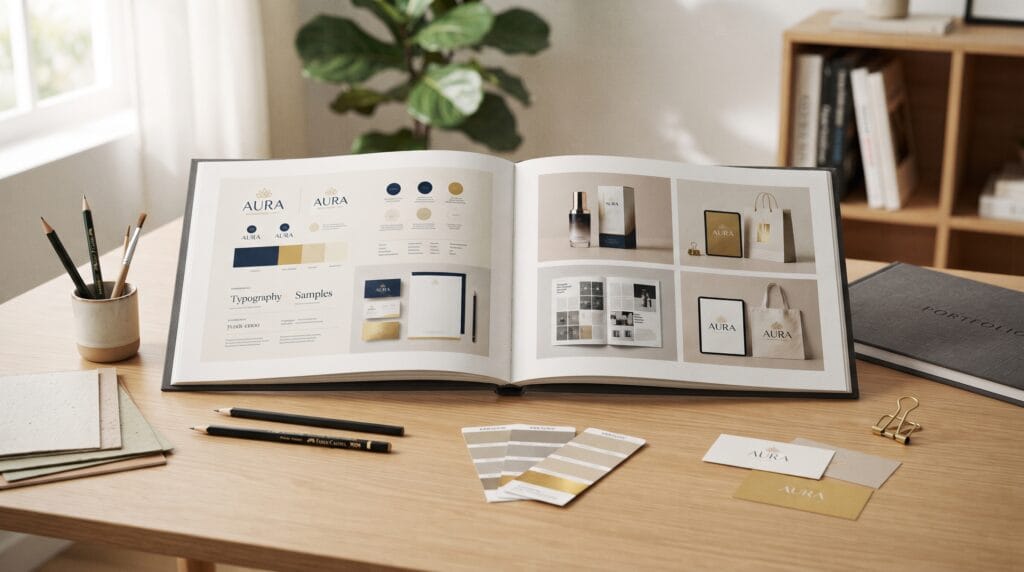
For example, a branding case study might show:
- Main logo
- Logo variations
- Color palette
- Typography
- Supporting graphics
- Mockup applications
This gives viewers a clearer understanding of the system.
Also Read: How to Choose Graphic Design Tools for Better Poster Design
5. Graphic Design Portfolio with Improve Image Quality
Poor image presentation can make good design look less professional.
Check your portfolio images for:
- Sharpness
- Correct cropping
- Consistent dimensions
- Balanced spacing
- Accurate colors
- Sufficient resolution
Avoid stretching low-resolution images.
Also keep image sizes optimized so your website does not become unnecessarily slow.
Professional presentation is part of the design.
Create Consistent Portfolio Layouts
Your portfolio itself should demonstrate design ability.
Use consistent rules for:
- Margins
- Image sizes
- Headings
- Body typography
- Project descriptions
- Backgrounds
- Spacing
Do not redesign the entire page differently for every project unless there is a strong reason.
A consistent structure lets the work become the focus.
Your graphic design portfolio should feel like one complete visual system.
6. Graphic Design Portfolio with Strengthen Your Personal Branding
Freelancers are also brands.
Your portfolio should communicate a recognizable professional identity.
You may define:
- Logo or wordmark
- Color palette
- Typography
- Photography
- Tone of voice
- Graphic style
Keep your personal branding simple enough that it does not compete with client projects.
Neutral portfolio design can often work well because it allows different projects to stand out.
Write a Clear Introduction
Your homepage or About section should quickly explain who you are.
For example:
Freelance graphic designer specializing in brand identity, packaging, and visual communication for small and growing businesses.
This is clearer than:
Creative thinker passionate about beautiful ideas.
Potential clients should immediately understand what you offer.
Make Your Graphic Design Portfolio Easy to Navigate
Complicated navigation can frustrate visitors.
A simple portfolio website might include:
- Home
- Work
- About
- Services
- Contact
You can also organize projects by category if necessary.
For example:
- Branding
- Packaging
- Editorial
- Digital
Do not make clients search for your contact details.
The portfolio should guide people toward taking the next step.
7. Graphic Design Portfolio with Add Clear Project Titles
Project titles should help visitors understand what they are viewing.
Instead of:
Project 01
consider:
Luna Coffee Brand Identity
or:
Northfield Skincare Packaging Design
You can also include a short category label:
Brand Identity / Packaging
Clear titles improve navigation and make the portfolio easier to scan.
Write Better Project Descriptions
Avoid filling project pages with generic design language.
Explain:
- What the client needed
- What you created
- Why you made key decisions
Keep writing simple and specific.
Instead of:
This dynamic visual ecosystem combines modern aesthetics with timeless creative energy.
try:
The identity uses a bold sans serif wordmark and a limited color palette to create a modern appearance that remains easy to reproduce across packaging and social media.
Specific language sounds more professional.
8. Graphic Design Portfolio with Add Client Results When Possible
Results can make a case study stronger.
Depending on the project, you might include:
- Increased engagement
- Improved conversion
- Successful product launch
- Increased sales
- New retail placement
- Better brand consistency
- Positive customer response
Only include numbers you can verify.
If measurable results are unavailable, explain what the project delivered.
For example:
The final system provided the client with consistent packaging, social media, and retail materials for the product launch.
This still demonstrates business value.
Add Testimonials to Your Graphic Design Portfolio
Client feedback can build trust.
A testimonial may describe:
- Communication
- Reliability
- Design quality
- Problem solving
- Professionalism
- Final results
Keep testimonials relevant and concise.
Place them near related projects when possible.
Social proof can make your graphic design portfolio more persuasive without requiring aggressive sales language.
9. Graphic Design Portfolio with Make Contact Easy
A visitor who likes your work should know what to do next.
Include a clear call to action.
Examples:
- Start a project
- Request a quote
- Get in touch
- Discuss your project
- Check availability
Your contact page can ask for useful information such as:
- Name
- Company
- Project type
- Budget range
- Timeline
- Project description
Avoid asking for too much information before the first conversation.
Optimize Your Portfolio for Mobile
Potential clients may discover your portfolio through social media or email on a phone.
Check how your portfolio appears on smaller screens.
Review:
- Navigation
- Image cropping
- Text size
- Button size
- Page speed
- Contact forms
- Project galleries
Large desktop mockups may need different layouts on mobile.
A responsive graphic design portfolio helps create a professional experience regardless of device.
Also Read: Holiday Graphic Design Styles That Inspire Better Designs
10. Graphic Design Portfolio with Keep the Website Fast
Large portfolio images can significantly slow page loading.
Compress images while maintaining acceptable quality.
Also avoid:
- Excessive animations
- Autoplay video everywhere
- Unnecessary scripts
- Huge background images
- Too many custom web fonts
Motion can enhance a portfolio, but it should not make browsing difficult.
Performance is part of user experience.
Include Personal Projects Strategically
You do not need paid client work for every project.
Personal projects can demonstrate skills you want to develop or services you want to sell.
For example, if you want packaging clients but have little professional packaging experience, create a thoughtful concept project.
Make it clear that it is self-initiated.
The quality of the thinking and presentation still matters.
Personal work can help direct your graphic design portfolio toward the career you want next.
Common Graphic Design Portfolio Mistakes
Showing Too Much Work
Remove projects that do not support your positioning.
Using Only Mockups
Show the actual design clearly.
Writing No Context
Explain the problem and solution.
Including Weak Older Work
Your portfolio should represent your current ability.
Making Navigation Complicated
Keep browsing simple.
Using Low-Quality Images
Presentation affects how the work is perceived.
Hiding Contact Information
Make it easy for potential clients to reach you.
Copying Another Designer’s Portfolio
Study other portfolios for inspiration, but build a presentation that reflects your own work and goals.
Graphic Design Portfolio Checklist
Before publishing or updating your portfolio, check that you have:
- Defined your preferred type of client
- Selected your strongest projects
- Removed outdated work
- Placed your best projects first
- Created clear case studies
- Explained project goals
- Included useful process work
- Used mockups selectively
- Added clean design views
- Used high-quality images
- Created consistent layouts
- Defined personal branding
- Written a clear introduction
- Used clear project titles
- Added project descriptions
- Included results when available
- Added relevant testimonials
- Created strong calls to action
- Made contact easy
- Checked mobile layouts
- Improved page speed
You do not need to rebuild everything at once.
Start with the projects potential clients see first.
Keep Your Graphic Design Portfolio Updated
A portfolio should evolve alongside your career.
Review it every few months.
Ask:
- Does this work still represent my skill level?
- Am I attracting the type of clients I want?
- Which projects receive the most attention?
- Are my case studies easy to understand?
- Do I need stronger examples in a particular category?
As your experience grows, replace weaker work with stronger projects.
The goal is not to continually make the portfolio larger.
The goal is to make it better.
Also Read: Graphic Design for Branding That Makes Products Look Better
Final Thoughts
A professional graphic design portfolio should make your skills, experience, and creative direction easy to understand.
Start by deciding what type of work you want to attract.
Then choose a smaller collection of strong projects, create thoughtful case studies, show useful process work, and present every project consistently.
Pay attention to the portfolio experience itself.
Clear navigation, high-quality images, readable typography, strong personal branding, mobile usability, and simple contact options all influence how professional your work feels.
Your graphic design portfolio does not need to contain every project you have ever created.
It should contain the projects that best communicate where you want your freelance career to go.
Review it regularly.
Remove weaker work.
Improve your case studies.
Add stronger projects as your skills develop.
When managed carefully, a graphic design portfolio becomes more than an online gallery.
It becomes a practical business tool that can help you attract better-fit clients, communicate your value, and build a stronger freelance design career.
For high-quality fonts to boost your income, check out Letter Crafted. Our professional fonts are perfect for branding, marketing, and content creation. So, don’t miss this opportunity.