
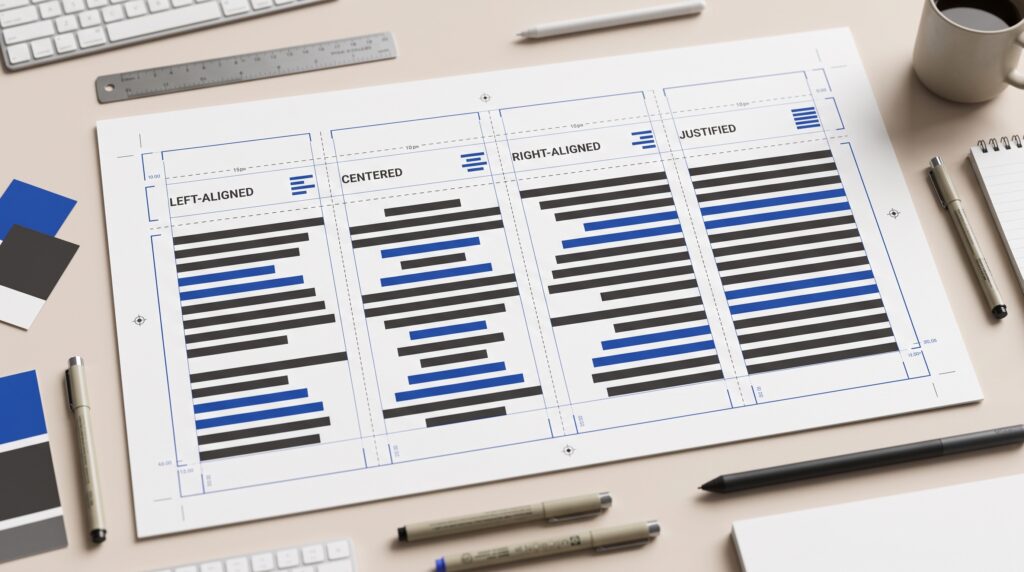
Text alignment in graphic design determines how lines of text sit within a layout and relate to nearby elements. It affects where readers begin, how comfortably they follow a paragraph, and whether information feels organized. A thoughtful alignment choice gives words a clear structure while supporting the character of the design.
Consider a poster with a heading, a description, and event details. Each element might look attractive individually, yet the composition can feel disconnected if their positions have no clear relationship.
This guide explains the main alignment options, when they can be useful, and how to review their effects. Start with the content and reading conditions, then choose an arrangement that helps the message.
What Text Alignment in Graphic Design Controls
Alignment establishes a consistent reference for placing text.
A paragraph may share a left edge, follow a central axis, end at a common right edge, or extend across both sides of a column.
These arrangements create different visual rhythms.
Alignment Connects Words With the Layout
A shared edge can connect a heading with its paragraph. A central axis can unite a short invitation. A right edge can organize compact labels beside other information.
Useful text alignment in graphic design involves more than selecting an option in an editor.
You also need to consider the text container, margins, neighboring images, and reading direction. The same setting can produce different results depending on where and how the text appears.
Left Text Alignment in Graphic Design
For left-to-right English text, left alignment provides a consistent starting edge.
The right side remains uneven as lines end naturally.
This gives readers a predictable place to return when moving from one line to the next.
Use Left Alignment for Sustained Reading
It is a practical starting point for articles, descriptions, instructions, and other longer passages.
For example, a workshop flyer might use a left-aligned title, description, and booking details along the same vertical guide.
Review the uneven right edge for distracting shapes or isolated words.
With text alignment in graphic design, choosing a useful default is only the beginning. Adjust the column width and wording where necessary so the paragraph remains comfortable to follow.
Centered Text Alignment in Graphic Design
Centered text arranges lines around a shared middle axis.
It can create a balanced, formal, or celebratory composition, particularly when the content is brief.
However, each line begins in a different horizontal position.
Keep Centered Text Focused
Consider it for short invitations, compact headlines, or a small amount of ceremonial text.
Avoid assuming that every supporting paragraph should follow the same setting.
A centered headline can sit above a left-aligned description when the relationship is deliberate.
Good text alignment in graphic design supports the content rather than forcing one arrangement across every element. If readers need to follow a long explanation, review whether a consistent starting edge would work better.
Right Text Alignment in Graphic Design
Right alignment creates a common ending edge while leaving the left side uneven.
It can help position short text beside an image or create a deliberate visual relationship with the right side of a composition.
For longer English passages, the changing starting positions require careful consideration.
Give Right-Aligned Text a Clear Role
Try it for a brief caption, a compact quotation, or selected information within a structured layout.
For example, a photograph may occupy the left side of a poster while a short right-aligned caption follows its opposite edge.
Test the complete composition.
Effective text alignment in graphic design makes the relationship understandable. The choice should help organize the page rather than appear as an unrelated decorative gesture.
Also Read: Top Color Trends in Graphic Design Designers Use Now
Justified Text Alignment in Graphic Design
Justified text aligns with both sides of a column, typically by adjusting spacing within the lines.
It can create a tidy rectangular block, but the spacing needs attention.
An attractive outer edge does not guarantee a comfortable reading experience inside the paragraph.
Inspect Spacing Between Words
Look for unusually wide gaps and visible channels of empty space running through the text.
Narrow columns can make these problems more noticeable.
Hyphenation and composition settings may help, but they need careful review rather than automatic acceptance.
When evaluating text alignment in graphic design, inspect realistic paragraphs at their intended size. A short placeholder passage may hide spacing problems that appear once the actual wording is inserted.
Connect Text Alignment With Visual Hierarchy
Alignment and hierarchy perform different jobs.
Alignment establishes relationships, while hierarchy indicates relative importance.
A heading and paragraph may share an edge yet remain clearly distinct through size, weight, and spacing.
Establish the Reading Order First
Identify what readers should notice first, second, and third.
Then use alignment to connect related information.
For an event poster, the title, date, and location should feel like parts of one message rather than separate objects placed wherever space remains.
Thoughtful text alignment in graphic design reduces unnecessary competition. You can create variety without giving every element its own unrelated axis.
Begin with a small number of clear relationships.
Use Guides to Support Text Alignment in Graphic Design
Guides make repeated positions easier to manage.
They can define margins, columns, central axes, and shared edges between text and images.
You do not need a complicated grid for every project.
Build a Simple Alignment Structure
Start with outer margins and one or two internal reference lines.
Place related elements according to those guides, then inspect the composition.
A guide is a tool for making decisions, not an instruction to fill every available column.
With text alignment in graphic design, a simple structure can provide enough consistency for a flyer, social post, or presentation slide. Add complexity only when the content gives you a reason.
Review Line Length and Paragraph Spacing
Alignment cannot correct every readability problem.
A paragraph may share a clean left edge while still having lines that feel too long or too short.
Spacing between lines and paragraphs also affects how the block reads.
Adjust the Container Alongside the Text
Test different widths using the actual content.
Check whether readers can follow the paragraph without frequent awkward breaks or excessively long lines.
Keep paragraph separation consistent and make headings feel connected to the text they introduce.
These decisions strengthen text alignment in graphic design because they support the same goal, an understandable reading structure.
Avoid fixing a crowded layout only by shrinking the text.
Also Read: Graphic Design Layout Ideas How to Use White Space Better
Check Text Alignment Across Different Formats
A layout may change when adapted from a poster to a narrow mobile graphic.
Longer wording, different languages, and smaller viewing conditions can reveal weaknesses in an arrangement.
Review each version rather than assuming the original choice will always transfer.
Test Real Content at the Intended Size
Check headings, captions, and essential details after resizing.
A centered two-line heading may become five uneven lines in a narrower format. A compact right-aligned label may no longer sit comfortably beside its image.
Effective text alignment in graphic design responds to the available space.
Also respect the reading direction of the language being used rather than treating left alignment as a universal answer.
Avoid Common Text Alignment Mistakes
Small inconsistencies can weaken an otherwise clear composition.
Watch for:
- Headings that nearly align with their paragraphs.
- Several unrelated alignment axes.
- Long centered passages.
- Justified text with distracting spacing.
- Captions positioned without a clear connection to images.
- Manual spaces used to imitate alignment.
- Essential text crowded against the edges.
Correct the structure before adding decoration.
A deliberate difference can be useful, but an accidental near-match often makes the layout feel unfinished. Compare related edges carefully and decide whether they should match or clearly separate.
Practice Text Alignment With One Simple Layout
Create a flyer containing a title, a short description, a date, a location, and a contact line.
Use the same content to produce three versions.
Compare Alignment Choices Directly
Make the first version left-aligned.
Create a second version with a centered title and supporting details, keeping the content brief.
For the third version, introduce a photograph and test a shared edge between the image and text.
Compare the results at the intended viewing size.
Ask someone what they notice first and whether any detail is difficult to follow.
This exercise makes text alignment in graphic design easier to understand because you can compare the effects without changing the message.
Refine the Layout Before Exporting
Review the finished composition with the actual wording in place.
Check spelling, unexpected line breaks, margins, and the relationship between each heading and its supporting information.
Then view the design outside the editing canvas.
A phone preview or printed sample can reveal issues that were less obvious while zoomed in.
Keep the editable file organized so future changes do not require rebuilding the alignment manually.
Consistency becomes easier when text remains in properly structured containers.
Also Read: 25 Graphic Design Tools for Beginners That Make Simple
Conclusion – Make Alignment Serve the Message
Text alignment in graphic design helps readers understand where to begin and how information belongs together.
Choose an arrangement that suits the content, language, and viewing conditions. Support it with sensible line lengths, spacing, and clear hierarchy.
Then review the result using real text rather than relying on the setting alone.
A strong alignment choice does not need to draw attention to itself. It gives the message a dependable structure and makes the reading experience feel more natural.
For high-quality fonts to boost your income, check out Letter Crafted. Our professional fonts are perfect for branding, marketing, and content creation. So, don’t miss this opportunity.