
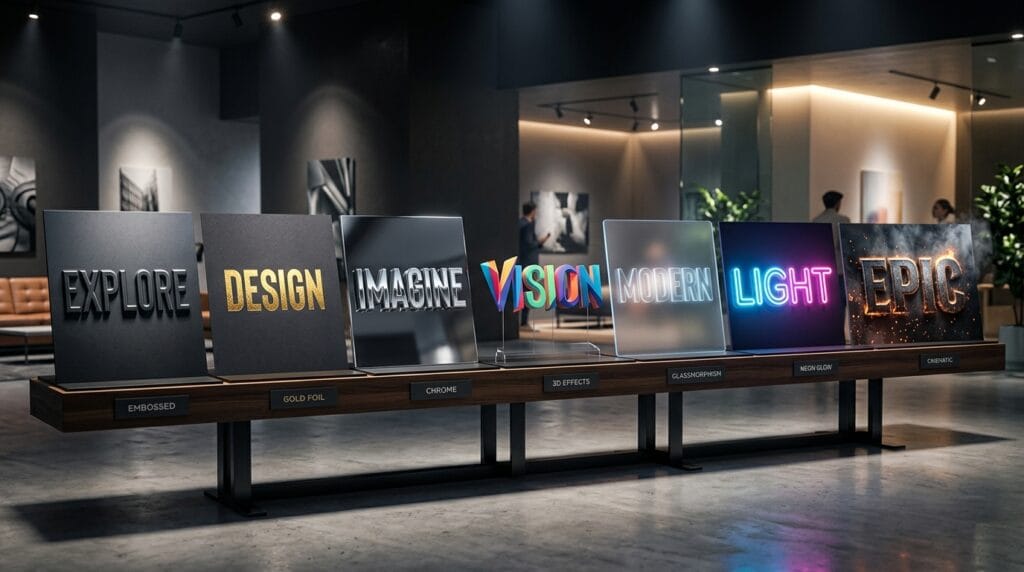
Using creative Photoshop text effects is one of the easiest ways to make typography stand out in modern design projects. Whether you are creating posters, logos, social media graphics, YouTube thumbnails, advertisements, or branding materials, text effects can transform ordinary typography into eye-catching visual elements.
Professional typography is about more than choosing the right font. Designers often use shadows, textures, gradients, lighting effects, and creative layer styles to add personality and visual impact. The best Photoshop text effects help communicate mood, reinforce branding, and improve overall design quality.
Modern graphic design trends continue evolving, but typography remains one of the most important visual components. Creative text effects can help a design feel luxurious, futuristic, retro, playful, dramatic, or minimalist depending on the project.
In this guide, you will discover 20 creative Photoshop text effects that designers and creators can use to build professional and unique typography.
Why Photoshop Text Effects Matter in Design
Strong Photoshop text effects help designers:
- Improve visual hierarchy
- Increase readability
- Strengthen branding
- Create memorable visuals
- Add depth and dimension
- Improve audience engagement
Creative typography often becomes the focal point of a design.
1. 3D Photoshop Text Effects
3D typography remains one of the most popular design styles.
This effect creates:
- Depth
- Realism
- Strong visual impact
3D text works well for:
- Posters
- Gaming graphics
- Branding projects
- Product advertisements
2. Metallic Photoshop Text Effects
Metallic typography creates a premium appearance.
Popular finishes include:
- Gold
- Silver
- Chrome
- Rose gold
These Photoshop text effects are commonly used in luxury branding and packaging design.
3. Neon Glow Photoshop Text Effects
Neon text creates vibrant visual energy.
This style often includes:
- Bright colors
- Outer glow effects
- Dark backgrounds
- Futuristic aesthetics
Neon typography works well for:
- Music promotions
- Gaming graphics
- Event posters
4. Glass Photoshop Text Effects
Glass typography creates a modern and elegant appearance.
Popular features include:
- Transparency
- Reflection
- Blur effects
- Soft highlights
Glass text remains popular in modern UI and branding projects.
5. Vintage Photoshop Text Effects
Retro typography continues to trend in branding.
Vintage effects often use:
- Grain textures
- Distressed surfaces
- Warm color palettes
- Classic letterforms
These Photoshop text effects work especially well for coffee brands, apparel, and packaging.
6. Luxury Gold Typography Effects
Luxury branding frequently uses gold typography.
This style often combines:
- Gold gradients
- Soft shadows
- Dark backgrounds
- Elegant serif fonts
Luxury text effects help brands appear more premium.
7. Chrome Photoshop Text Effects
Chrome typography creates a futuristic and reflective appearance.
This effect works well for:
- Technology branding
- Gaming graphics
- Automotive promotions
- Modern advertising
Chrome finishes remain a popular typography trend.
8. Embossed Photoshop Text Effects
Embossed typography creates depth through raised surfaces.
Benefits include:
- Professional appearance
- Subtle dimensionality
- Print-inspired aesthetics
Emboss effects are often used in branding and packaging projects.
9. Shadow Typography Effects
Shadows remain one of the simplest yet most effective typography techniques.
Shadow effects improve:
- Readability
- Depth
- Visual hierarchy
Subtle shadows often look more professional than dramatic ones.
10. Gradient Photoshop Text Effects
Gradients continue dominating modern design trends.
Popular gradient styles include:
- Purple to blue
- Orange to pink
- Gold to bronze
- Soft pastel transitions
These Photoshop text effects create vibrant visual interest.
Also Read: The Best Photoshop Keyboard Shortcuts For Designers, Editors, And Creatives
Creative Photoshop Text Effects for Branding Projects
Branding projects often use typography as a primary visual element.
Strong text effects improve:
- Logo presentation
- Marketing visuals
- Brand recognition
- Product packaging
11. Minimal Typography Effects
Minimal typography focuses on:
- Clean layouts
- Simple shadows
- Subtle contrast
- Elegant spacing
Minimal designs often feel:
- Modern
- Professional
- Timeless
12. Foil Photoshop Text Effects
Foil effects simulate luxury print finishes.
Popular options include:
- Gold foil
- Silver foil
- Copper foil
These typography effects are common in invitations, beauty branding, and luxury packaging.
13. Holographic Typography Effects
Holographic styles use:
- Rainbow reflections
- Metallic gradients
- Futuristic textures
This effect remains popular in youth-focused branding and fashion design.
14. Frosted Glass Text Effects
Frosted glass typography combines:
- Blur effects
- Transparency
- Soft lighting
This style creates elegant and contemporary visuals.
15. Paper Cut Photoshop Text Effects
Paper cut styles create layered depth.
These effects often include:
- Shadow layers
- Cutout shapes
- Dimensional composition
Paper-inspired typography works well for posters and social media content.
Modern Photoshop Text Effects for Social Media
Social media graphics require attention-grabbing typography.
Strong Photoshop text effects help increase engagement and visibility.
16. Bold Outline Typography Effects
Outline typography improves readability on busy backgrounds.
Benefits include:
- Strong contrast
- Better visibility
- Modern aesthetics
This style is common in YouTube thumbnails and Instagram graphics.
17. Graffiti Photoshop Text Effects
Graffiti typography creates:
- Urban energy
- Creative personality
- Street-style branding
Popular for:
- Music graphics
- Streetwear branding
- Youth marketing campaigns
18. Fire and Flame Typography Effects
Fire effects create dramatic visuals.
This style often includes:
- Glow effects
- Smoke textures
- Orange and red color palettes
Fire typography works well for gaming and promotional designs.
19. Ice Typography Effects
Ice-themed text creates:
- Cool tones
- Frozen textures
- Crystal effects
These Photoshop text effects are popular for seasonal and winter-themed projects.
20. Futuristic Photoshop Text Effects
Futuristic typography remains one of the strongest design trends.
Common features include:
- Neon lighting
- Metallic textures
- Geometric shapes
- Sci-fi aesthetics
This style works well for:
- Technology branding
- Gaming visuals
- Digital marketing campaigns
Best Tools for Creating Photoshop Text Effects
Professional typography often combines Photoshop with additional creative tools.
Adobe Illustrator
Helpful for:
- Vector typography
- Logo lettering
- Scalable text design
- Custom typography systems
Illustrator complements Photoshop perfectly.
Canva
Useful for:
- Quick typography experiments
- Social media graphics
- Marketing visuals
- Template-based designs
Canva provides simple text effect options for beginners.
Also Read: Best Illustrator Text Effects For Stunning Designs
Common Mistakes When Using Photoshop Text Effects
Many designers overuse effects.
Common mistakes include:
Too Many Effects
Excessive shadows, glows, and textures often reduce professionalism.
Weak Typography Choice
A great effect cannot fix a poor font selection.
Start with strong typography first.
Poor Readability
Text should remain readable regardless of effects.
Always prioritize clarity over decoration.
Following Trends Blindly
Not every trend fits every project.
Choose Photoshop text effects based on audience and branding goals.
How to Choose the Right Text Effects in Photoshop
The best typography effect depends on project goals.
Examples:
- Luxury brands → Gold foil, metallic, embossed
- Gaming brands → Neon, chrome, futuristic
- Food brands → Vintage, playful, bold outline
- Technology brands → Glass, chrome, holographic
- Social media graphics → Gradient, outline, shadow
Matching typography to brand personality improves visual communication.
Also Read: Photoshop Remove Background and Replace With New Backdrops
Final Thoughts
Creative Photoshop text effects help designers transform ordinary typography into memorable visual elements. Whether you prefer luxury gold lettering, futuristic chrome styles, retro textures, or bold social media typography, the right effect can significantly improve the impact of your designs.
The most successful typography combines strong font selection, balanced composition, good readability, and appropriate styling. Rather than applying every available effect, focus on enhancing the message and supporting the overall design concept.
By mastering these Photoshop text effects, designers and creators can build more professional branding, stronger marketing visuals, and more engaging creative projects across digital and print platforms.
For high-quality fonts to boost your income, check out Letter Crafted. Our professional fonts are perfect for branding, marketing, and content creation. So, don’t miss this opportunity.