
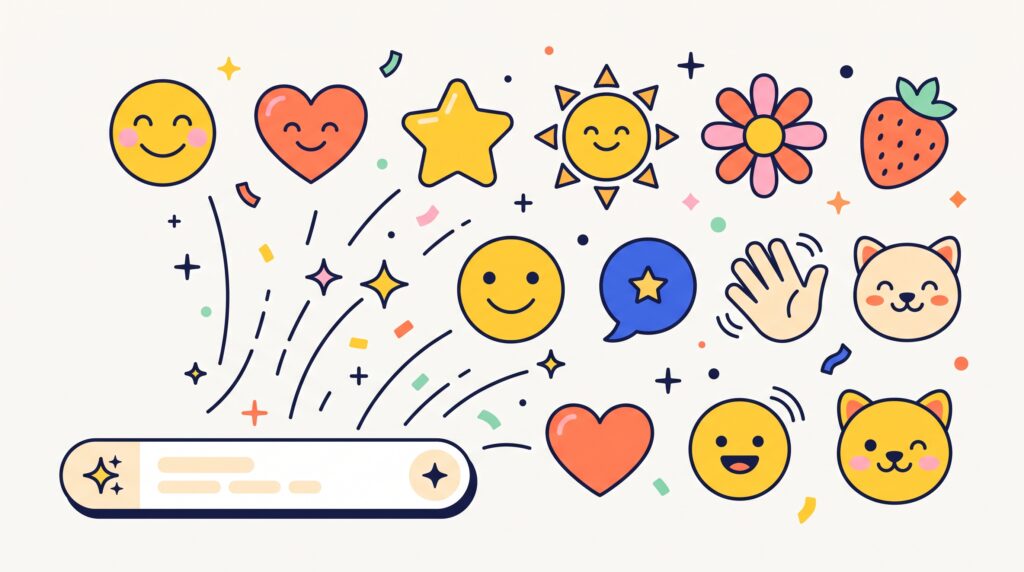
AI emoji style prompts help creators describe expressive graphics built from simple shapes, clear faces, and flat colors. Instead of requesting a vague “cute emoji,” you can specify the silhouette, expression, outline, and level of detail you want. Those decisions give the image generator a clearer visual direction and make the results easier to compare.
Flat emoji-inspired graphics can work as reaction images, decorative icons, or elements in social media designs. However, generating an image does not automatically turn it into a functional emoji or an editable vector.
This guide includes 10 original prompts and practical ways to refine them. Start with one character, establish its visual rules, and expand the collection gradually.
What Makes AI Emoji Style Prompts Effective?
A strong prompt explains both the subject and the visual system surrounding it.
For a flat style, describe solid fills, simple outlines, minimal facial features, and a recognizable silhouette. Also state which effects you want to avoid.
Useful AI emoji style prompts include:
- One clearly defined subject.
- A specific expression.
- A limited color palette.
- Consistent outline treatment.
- Minimal decorative details.
- A simple background or transparent output.
A Simple Emoji Prompt Formula
Use this structure:
Create an original flat emoji-inspired illustration of (subject) with (expression). Use (shapes), (colors), and (outline style). Center the subject and keep details minimal. Avoid (unwanted effects).
If your tool supports a transparent-background setting, enable it directly. Asking for transparency in the prompt alone may not produce a usable transparent file.
1. AI Emoji Style Prompts for a Cheerful Face
Begin with a simple face so you can evaluate the style without complicated anatomy or accessories.
A recognizable expression depends on the relationship between the eyes, eyebrows, and mouth.
Prompt:
Create an original cheerful emoji-inspired face using a clean circular silhouette. Solid warm-yellow fill, two small dark oval eyes, gently raised eyebrows, and a simple curved smile. Consistent charcoal outline, centered square composition, minimal details. Strictly flat illustration, no gradients, shadows, highlights, text, or 3D effects.
 Example|Image Source: ChatGPT
Review the Expression at Small Sizes
Reduce the result to its intended display size.
These AI emoji style prompts are useful only if the expression remains understandable after shrinking. Remove tiny features that disappear or create visual noise.
2. AI Emoji Style Prompts for a Surprised Reaction
Surprise can be communicated with a few deliberate changes rather than extra detail.
Keep the silhouette and palette similar to your cheerful face.
Prompt:
Create an original surprised emoji-inspired face in a flat graphic style. Round yellow head, dark oval eyes, raised curved eyebrows, and a small open circular mouth. Match the proportions of a simple reaction icon. Uniform charcoal outline, solid fills, centered composition. No shading, gradients, accessories, lettering, or platform-specific emoji styling.
 Example|Image Source: ChatGPT
Keep Reactions Within One Visual Family
Compare the eye placement, outline, and head shape with your first icon.
When using AI emoji style prompts for multiple emotions, change the expression while preserving the underlying structure. This gives the collection a more coherent appearance.
3. AI Emoji Style Prompts for a Sleepy Face
A sleepy expression benefits from restrained features.
Avoid adding several symbols that compete with the face.
Prompt:
Create an original sleepy emoji-inspired face with a round warm-yellow silhouette. Two gently curved closed eyes, relaxed eyebrows, and a small neutral mouth. Flat solid colors, consistent dark outline, generous space around the head. Quiet, friendly expression. No letters, floating symbols, gradients, shadows, or realistic textures.
 Example|Image Source: ChatGPT
Use Features Instead of Labels
The face should communicate its mood without a caption.
If the result looks sad rather than sleepy, adjust the eyebrows and mouth. Clear AI emoji style prompts describe the intended relationship between features, not just the emotion’s name.
Also Read: How to Write 3D Character Prompts for Better AI Images
4. AI Emoji Style Prompts for a Friendly Cat
Animal characters introduce distinctive silhouettes while keeping the same flat visual language.
Choose a few features that immediately identify the animal.
Prompt:
Create an original flat emoji-inspired cat face. Rounded head, two simple triangular ears, warm coral fill, cream muzzle, small dark eyes, and a friendly curved mouth. Use only two short whiskers on each side. Consistent charcoal outline, centered square composition. No fur texture, gradients, shading, accessories, text, or 3D effects.
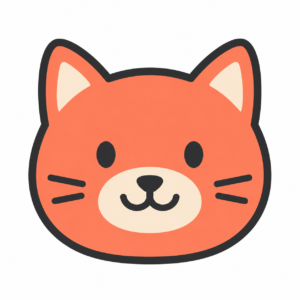 Example|Image Source: ChatGPT
Simplify Animal Details
Inspect the ears, muzzle, and whiskers for awkward overlaps.
These AI emoji style prompts should produce a clear animal identity without relying on realistic anatomy. Reduce whiskers or markings if they become distracting at the final size.
5. AI Emoji Style Prompts for a Smiling Strawberry
Food characters combine a recognizable object with a simple expression.
The face should support the subject rather than hide its defining features.
Prompt:
Create an original flat emoji-inspired strawberry character. Simple rounded triangular coral-red silhouette, three small seed marks, and a compact sage-green leaf crown. Add two dark oval eyes and a cheerful curved smile. Uniform charcoal outline, solid fills, centered composition. No gradients, glossy highlights, shadows, lettering, or realistic food texture.
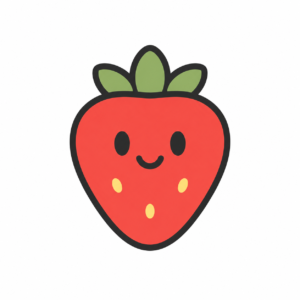 Example|Image Source: ChatGPT
Preserve the Food Silhouette
Check whether the character still reads as a strawberry without its face.
For food-based AI emoji style prompts, the outline and key features should identify the object first. Facial details then add personality without making recognition harder.
6. AI Emoji Style Prompts for a Playful Cloud
Weather icons can communicate moods through shape and expression.
A cloud needs a clean outer contour to avoid looking like an uneven blob.
Prompt:
Create an original flat emoji-inspired cloud with a simple three-lobed silhouette. Solid pale sky-blue fill, dark oval eyes, and a small playful smile. Consistent charcoal outline with rounded corners. Centered square composition, minimal details, ample surrounding space. No raindrops, lightning, gradients, shadows, text, or dimensional effects.
 Example|Image Source: ChatGPT
Keep Weather Characters Distinct
If you later create rain or storm variations, preserve the main cloud structure.
Add only the details necessary to distinguish the variation. This makes AI emoji style prompts easier to refine and prevents each character from drifting into a different illustration style.
7. AI Emoji Style Prompts for a Friendly Sun
A sun character offers a simple opportunity to combine geometric elements.
Keep the rays balanced and avoid excessive ornament.
Prompt:
Create an original flat emoji-inspired sun character. Circular warm-yellow center surrounded by eight short, evenly spaced orange triangular rays. Small dark eyes and a relaxed smile inside the circle. Uniform charcoal outline, solid colors, clean geometric construction. No gradients, glowing effects, shadows, lettering, or realistic lighting.
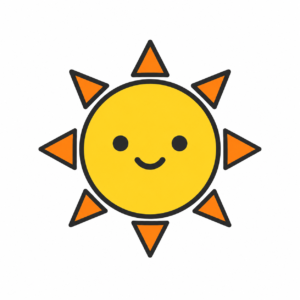 Example|Image Source: ChatGPT
Check the Ray Arrangement
Look for uneven spacing, merged rays, or unexpected extra shapes.
Simple geometry can reveal inconsistencies quickly. Review the entire contour before approving the result, especially if the icon will appear beside other carefully structured graphics.
Also Read: How to Write Funny Cartoon Prompts for Better AI Images
8. AI Emoji Style Prompts for a Celebration Star
A star can suggest excitement without requiring a complicated scene.
Its expression should remain secondary to the recognizable shape.
Prompt:
Create an original flat emoji-inspired celebration star. Rounded five-point silhouette, solid golden-yellow fill, small dark oval eyes, and a joyful open smile. Add two tiny coral confetti shapes outside the star, keeping them clearly separated. Consistent charcoal outlines, centered composition. No glitter, gradients, shadows, text, or 3D rendering.
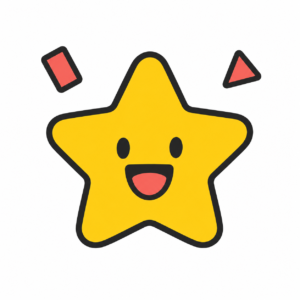 Example|Image Source: ChatGPT
Limit Supporting Decorations
Remove the confetti if it disappears at small sizes or makes the composition feel crowded.
These AI emoji style prompts should produce a usable central character. Decorative extras are optional, especially when the graphic needs to function in a compact layout.
9. AI Emoji Style Prompts for a Caring Heart
A heart character can express affection through a restrained face and clear shape.
Avoid duplicating the exact appearance of a familiar platform graphic.
Prompt:
Create an original flat emoji-inspired heart character with a balanced rounded silhouette. Solid dusty-rose fill, two small dark eyes, and a gentle curved smile. Uniform charcoal outline, centered square composition, minimal facial details. No hands, sparkles, glossy highlights, gradients, shadows, lettering, or existing platform emoji designs.
 Example|Image Source: ChatGPT
Match the Collection’s Proportions
Compare the heart’s visual size with the other characters.
Different shapes occupy space differently. Adjust margins and feature placement so each icon feels similarly prominent, even when their outer dimensions do not match exactly.
10. AI Emoji Style Prompts for a Matching Collection
Once you have a satisfactory style, use it as the foundation for related graphics.
A small collection is easier to review than a large sheet of unrelated characters.
Prompt:
Create a flat illustration concept sheet containing four original emoji-inspired characters: a cheerful face, a friendly cat, a smiling strawberry, and a playful cloud. Use consistent charcoal outlines, simple oval eyes, curved mouths, and solid yellow, coral, sage, and sky-blue fills. Equal spacing on an ivory background. No labels, gradients, shadows, or 3D effects.
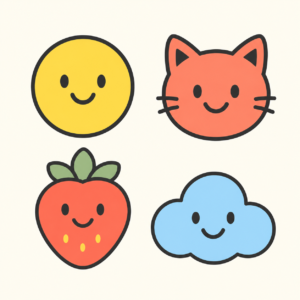 Example|Image Source: ChatGPT
Treat the Sheet as a Style Preview
Review consistency across all four characters.
For final assets, generating or refining each icon separately can provide more control. A concept sheet may introduce variations in outline weight, scale, or facial construction that need correction.
How to Refine AI Emoji Style Prompts
Change one main feature at a time: silhouette, expression, outline, palette, or detail level.
Keep a short style reference describing the decisions you want to preserve. Where supported, a reference image can help communicate the approved direction.
Inspect the result at both large and small sizes. Check edges, background transparency, and export dimensions.
Also remember that a flat-looking image may still be a raster file. If you need editable vector shapes, plan for a separate drawing or conversion workflow and inspect the result afterward.
Also Read: AI Art Styles Prompts for Artists Who Love Playful Visuals
Conclusion – Create Clearer Emoji-Inspired Graphics
AI emoji style prompts become more useful when they describe a recognizable subject and a consistent set of visual rules.
Start simply, compare expressions, and remove details that weaken small-size readability.
Thoughtful prompting helps you explore the character. Careful refinement turns that exploration into a graphic that fits your collection and communicates its mood clearly.
For high-quality fonts to boost your income, check out Letter Crafted. Our professional fonts are perfect for branding, marketing, and content creation. So, don’t miss this opportunity.