
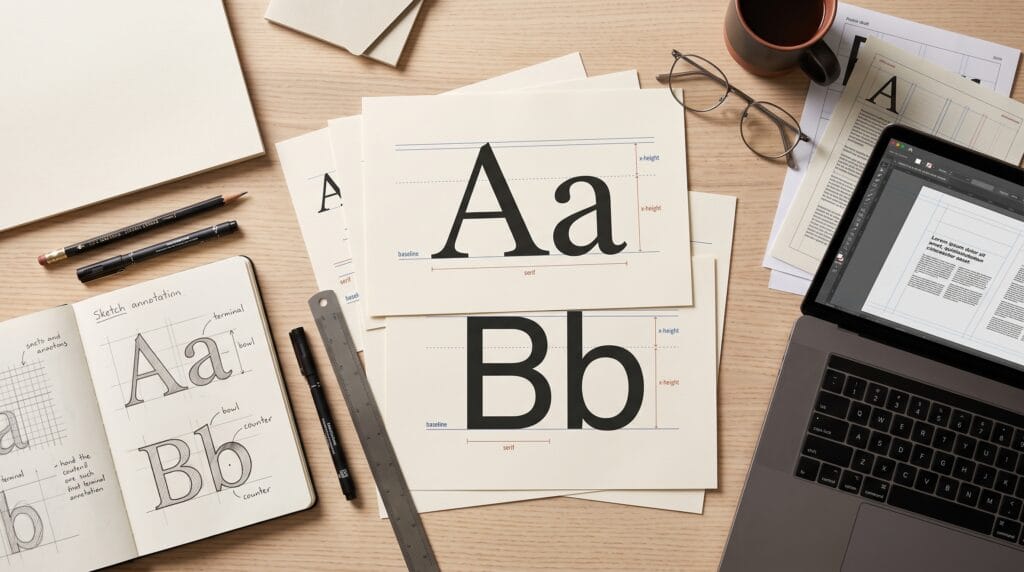
This typography tutorial for beginners explains how to turn ordinary text into clear, attractive communication. Typography involves choosing typefaces, arranging words, and controlling spacing so readers can understand your message comfortably. Whether you are designing a poster, website, social media graphic, or brand presentation, these skills help your work feel more intentional.
You do not need a large font collection to begin. A few carefully chosen styles, a clear reading order, and consistent spacing can improve a layout considerably.
Throughout this guide, you will learn essential terms and practice decisions that apply across different design tools. Start with simple compositions, then build confidence by comparing and refining your choices.
1. Typography Tutorial for Beginners with Understand the Basics
Typography is the arrangement of type for communication. It influences both readability and the personality of a design.
A typeface is a family of letterforms with a shared visual character. A font is a particular implementation or style within that family, such as a regular or bold version.
In everyday conversation, people often use these terms interchangeably. Understanding the distinction helps when selecting styles and organizing your design files.
Beginner Typography Terms Worth Knowing
Learn these useful terms first:
- Baseline: the line on which most letters sit.
- X-height: the height of lowercase letters such as “x.”
- Weight: how light or heavy the strokes appear.
- Leading: the distance between lines of text.
- Kerning: adjustments between particular letter pairs.
- Tracking: spacing adjustments across a selection of characters.
This typography tutorial for beginners uses these concepts to explain practical improvements rather than complicated theory.
2. Typography Tutorial for Beginners with Choose a Typeface
Choose a typeface according to the message, audience, and reading environment. A decorative headline and a long article have different requirements.
For example, an exhibition poster may benefit from an expressive title. Meanwhile, its location, date, and booking details need straightforward lettering.
Common Typeface Categories for Beginners
- Serif typefaces have small finishing strokes and can suit editorial, literary, or formal compositions.
- Sans serif typefaces lack those finishing strokes and can work well in interfaces, signage, and contemporary layouts.
- Script typefaces resemble handwriting or calligraphy. They are often useful for short accents, but elaborate forms can make longer passages difficult to read.
- Display typefaces are designed for prominent use, such as headlines. Many are unsuitable for small supporting text.
These categories are starting points. Judge the actual letterforms rather than assuming every serif feels traditional or every sans serif feels modern.
3. Typography Tutorial for Beginners with Build Visual Hierarchy
Visual hierarchy shows readers what to notice first, second, and third.
Without hierarchy, a layout can feel like several messages competing for attention. Instead, create a clear relationship between the headline, supporting information, and smaller details.
A simple event poster might use:
- A large event name.
- A medium-sized description.
- Smaller date and location details.
- A clearly visible booking instruction.
Create Typography Hierarchy With Contrast
You can establish importance through size, weight, spacing, and placement. Avoid relying on color alone because the distinction may disappear in some viewing conditions.
Begin with three text levels and check whether their roles are obvious.
This typography tutorial for beginners recommends changing one variable at a time. Increase headline size first, then adjust weight if the separation still feels weak.
Also Read: Photoshop Text Effect Tutorial for Better Design Results
4. Typography Tutorial for Beginners with Pair Fonts Carefully
Font pairing works best when each typeface has a clear job.
One typeface can handle headlines while another supports body text. Alternatively, use different weights from a single family to create variety without introducing another visual style.
For an early project, limit yourself to one or two families. This makes consistency easier to maintain.
Beginner Font Pairing Through Shared Qualities
Compare the proportions, letter shapes, and overall tone of your options.
A distinctive serif headline may pair well with a restrained sans serif body style. However, contrast alone does not guarantee harmony. Test the combination using your actual content.
Check whether both remain readable at their intended sizes. If the body text looks weak beneath the headline, try a slightly stronger weight before replacing the typeface.
Use this typography tutorial for beginners as a reminder that a successful pairing supports the message.
5. Typography Tutorial for Beginners with Refine Letter Spacing
Spacing can make a suitable typeface look awkward or polished.
Kerning is especially noticeable in large headlines, where uneven gaps become easier to see. Letter pairs such as “AV” or “To” may need attention, depending on the font.
Judge the visual space between letters rather than trying to make every numerical gap identical.
Kerning and Tracking for Beginner Designers
Start with the font’s default spacing. Then inspect the headline at its final display size.
If one pair creates a distracting gap, adjust that pair gently. Use tracking when the whole word or text selection needs a spacing change.
Wider tracking can sometimes help short uppercase labels. However, excessive spacing breaks the connection between letters.
In this typography tutorial for beginners, the goal is a comfortable visual rhythm. Avoid manual spacing changes throughout long body text unless there is a specific problem to solve.
6. Typography Tutorial for Beginners with Improve Reading Comfort
Readable typography depends on more than font size. Line length, leading, contrast, and surrounding space all affect how comfortably people read.
A paragraph may look attractive in a large design preview but become difficult on a phone.
Test the layout in realistic viewing conditions before approving it.
Line Spacing and Paragraphs for Better Readability
Use enough leading to separate lines without making the paragraph feel disconnected. Adjust it according to the typeface, text size, and available width.
Very long lines can make returning to the next line difficult. Extremely short lines can create frequent interruptions.
Keep paragraphs manageable and distinguish them with consistent spacing. For most beginner layouts, left alignment provides a predictable starting edge.
This typography tutorial for beginners encourages checking complete paragraphs rather than judging readability from a single sample word.
Also Read: Simple Photo Editing Tutorial for Clean and Aesthetic Photos
7. Typography Tutorial for Beginners with Use Alignment and Space
Alignment connects separate elements and gives a composition structure.
Choose a clear edge or grid, then align headings, paragraphs, and supporting details deliberately. Small inconsistencies can make an otherwise simple layout feel unfinished.
Centered text can work for short invitations or compact headings. However, longer passages often become harder to scan when every line begins in a different position.
White Space in Beginner Typography Layouts
White space is the unoccupied area around your content. It helps separate ideas and gives important information room to stand out.
Keep related elements close together. For example, a heading should usually sit closer to its own paragraph than to the section above.
Apply this typography tutorial for beginners by removing unnecessary elements before shrinking text. A crowded layout often needs less content or better grouping.
Practice This Typography Tutorial for Beginners
Create a simple poster for an imaginary design workshop. Include a title, one-sentence description, date, location, and registration instruction.
Use a small number of text styles so you can focus on relationships.
A Simple Beginner Typography Exercise
Follow this sequence:
- Place the content: add every required detail before decorating.
- Choose typefaces: select one family or a restrained pairing.
- Set hierarchy: make the title prominent and supporting information clear.
- Align elements: use a consistent edge and generous margins.
- Refine spacing: inspect line breaks, leading, and headline kerning.
- Test the result: view the poster at its intended size.
Create a second version using the same words and a different hierarchy. Compare which version communicates the event more quickly.
This exercise turns a typography tutorial for beginners into a repeatable practice session.
Common Beginner Typography Mistakes to Avoid
Beginners often add more fonts or effects when a layout feels uninteresting. However, the underlying issue may be unclear hierarchy or inconsistent spacing.
Watch for:
- Too many typefaces competing for attention.
- Thin text over a busy image.
- Long passages in uppercase.
- Decorative fonts used for essential small details.
- Inconsistent heading styles.
- Distorted letterforms caused by stretching text.
Before adding shadows or outlines, improve size, weight, alignment, and contrast. Also review spelling and awkward line breaks.
Keep a short style reference for headings, paragraphs, and labels. Consistency makes future pages easier to build.
Also Read: How to Make Pinterest Pins That Get More Clicks and Saves
Conclusion – Turn Typography Basics Into Better Design
This typography tutorial for beginners gives you a practical foundation for choosing typefaces, organizing information, and refining spacing.
Begin with one simple project. Make its reading order obvious, test the text at the intended size, and adjust the details that interrupt comprehension.
With regular practice, you will recognize why one composition feels clearer than another. Thoughtful typography helps your ideas reach readers with confidence and gives your design a more coherent visual voice.
For high-quality fonts to boost your income, check out Letter Crafted. Our professional fonts are perfect for branding, marketing, and content creation. So, don’t miss this opportunity.